PARCELMETRIC / PROPERTY RESEARCH & OPERATIONS

Find properties. See the whole picture.

Search by owner, address or property size. See the boundaries and records together. Use Copilot to explore the property, then build your shortlist.

Public demo: Franklin, Allen & Putnam counties, Ohio. Saved February–March 2026 records; properties are not sale listings. Additional coverage and deployment are quoted separately.

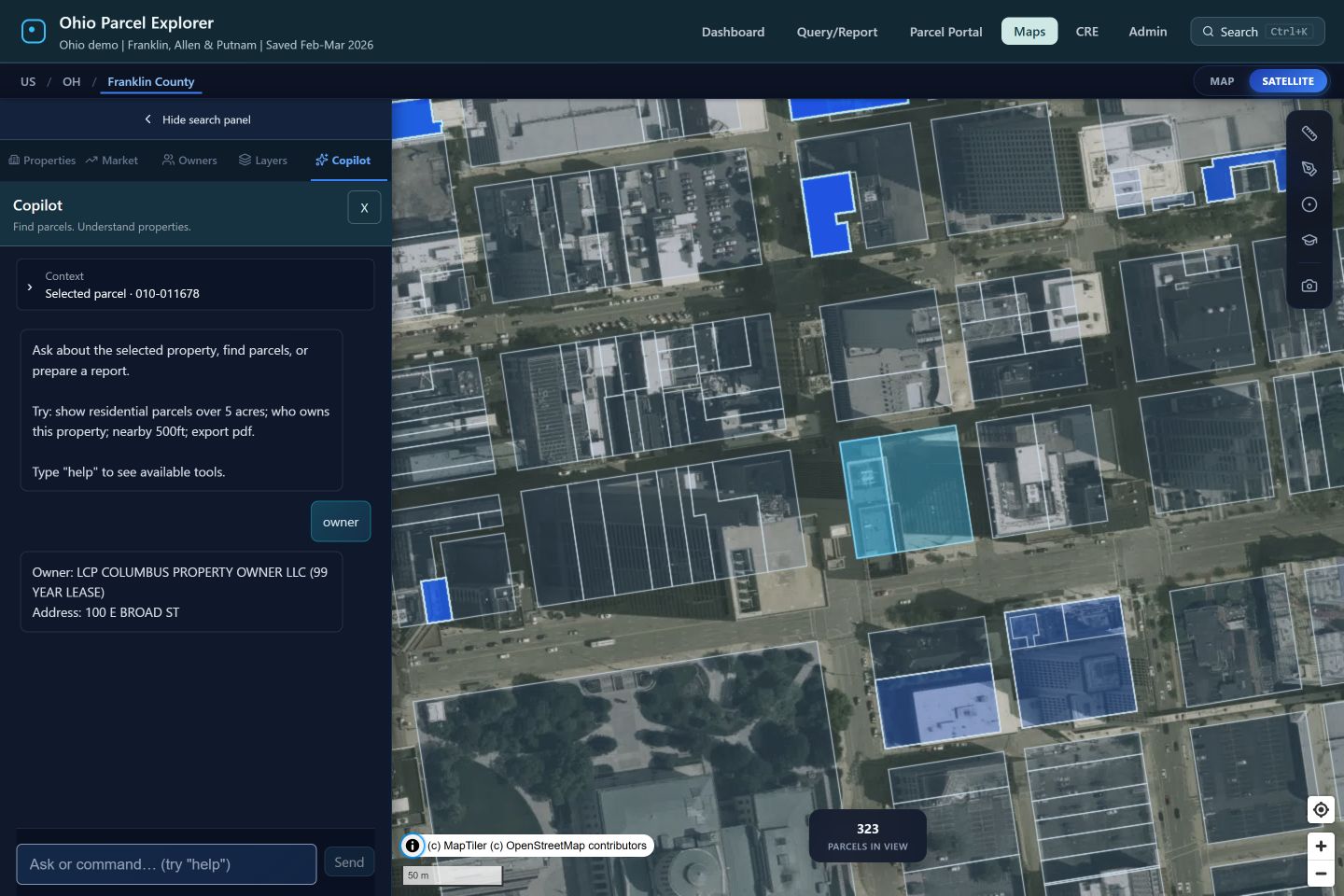
Actual ParcelMetric Copilot answering a question about the selected property beside its aerial parcel map
Actual software. A selected parcel gives Copilot the property context.
Find the fit

Combine location, property characteristics, and available ownership signals.

Understand the context

Bring recorded sales, market patterns, and configured area data into the research.

Carry the work forward

Keep lists, contacts, deal stages, and operational records connected.

PROPERTY INTELLIGENCE YOU CAN PUT TO WORK

Ask a real question.
See a working answer.

Choose a job below. See the actual ParcelMetric result, then try the same research yourself.

AI-ASSISTED PROPERTY SEARCH

“Show commercial parcels between 2 and 10 acres.”

Ask Copilot in plain language. Inspect the matching records and map selection, then narrow the properties worth your attention.

3,076matching records

From a county-wide search to a focused research set.

Captured result from the saved Franklin edition. The map selected the first 1,000 of 3,076 matches. Recorded classifications and acreage do not establish that a property is for sale.
Try it in the public preview

Open the Franklin map, choose Copilot, and enter the question above.

Try this property search
No signup required · Franklin, Allen & Putnam, Ohio · Saved February–March 2026 records

Your area. Your question. Your next decision.

Use the software, inspect a free data sample, or have us scope the research your team needs.

Build my property research brief
Actual ParcelMetric screen
Actual ParcelMetric Copilot search returning 3,076 matches for commercial parcels between 2 and 10 acres, with the first 1,000 selected

Captured result from the saved Franklin edition. The map selected the first 1,000 of 3,076 matches. Recorded classifications and acreage do not establish that a property is for sale.

START WITH THE JOB YOU NEED DONE

One workspace. A more useful answer.

Choose a question to see how ParcelMetric helps you move it forward.

Describe the properties you need.

Copilot turns supported requests into map selections, queries, statistics, and exports. You can inspect the plan and keep working with the results.

THE QUESTION

“Show parcels over 10 acres and value under 500k.”

  1. 1

    Copilot interprets the acreage and assessed-value criteria.

  2. 2

    ParcelMetric finds matching records in the selected area.

  3. 3

    Inspect the selection, compare properties, or export a working list.

What you get

A reusable selection to compare, investigate, and export.

Show me this workflow
Actual parcel map. The request above illustrates a supported workflow; this image is not its search result.

Available commands and fields depend on the connected county. Model-backed planning requires a configured AI provider. Record changes require confirmation.

ACTUAL SOFTWARE / EXPLORE THE WORKSPACE

See what your team can do.

Choose a task. Inspect the application. Bring your own workflow to a demonstration.

Workspace overview

Keep properties, lists, and projects together.

Move between property lookup, owner search, saved lists, project tracking, contacts, and zoning research from the same workspace.

What this helps you do

A shared starting point for your property research.

Next: demonstrate this workflow, confirm your sources and coverage, then receive a deployment scope and quote.

Evaluate this for my team
Actual application capture. Records and available fields depend on connected sources. This website tour does not query live data.
Actual ParcelMetric CRE Command Center with lists, projects, contacts and research tools

Workspace overview · Actual application capture

YOUR TEAM. YOUR SOURCES. YOUR WORKFLOW.

See the fit before you commit.

  1. 1. Show us the work

    Tell us your locations, sources, and the property questions your team handles.

  2. 2. Inspect the software

    Walk through the relevant tools and confirm the records, fields, and integrations you need.

  3. 3. Agree on deployment

    Review scope, setup, support, pricing, and acceptance criteria before paid work starts.

MORE OF THE WORK, CONNECTED

Go deeper when the decision needs it.

The map is the starting point. These modules help turn property records into research, decisions, and organized work.

AI Copilot & map tools

Turn supported requests into map actions your team can inspect.

  • Owner, address, acreage, and value queries
  • Selected-parcel and grouped statistics
  • Named-boundary and in-view searches
  • Map selection, CSV and parcel PDF exports
  • Confirmed creation of operational records

Property & market research

Screen a location, inspect the records, and compare the context.

  • Recorded ownership and sale history
  • Comparable sales by radius and class
  • Annual sales and price patterns
  • Property intelligence and assessment history
  • Cap-rate calculator using entered assumptions

Area & map context

Choose the layers that answer your location question.

  • Parcel boundaries and thematic value maps
  • County and tract Census measures
  • Population, income, housing, education, and commute context
  • School locations and district boundaries
  • Available zoning and local map layers

Lists, projects & deals

Keep research attached to the opportunity it supports.

  • Saved parcel lists and project notes
  • Property-linked contacts
  • Deal stages and stage history
  • Entered and weighted pipeline values
  • Saved search criteria and configured count-change alerts

Local-government operations

Connect places, people, assignments, and status.

  • Permit records and status tracking
  • Inspector assignments and scheduled dates
  • Work orders, priorities, and crews
  • Stormwater assets and inspection records
  • Staff and administrator access controls

Quality, history & reporting

Make the evidence behind a decision easier to review.

  • Valuation snapshots and comparison
  • Rule-based valuation quality checks
  • Explainable review-priority scores
  • Configured levy-impact scenarios
  • Public-records packets with CSV, PDF, and redaction profiles

We confirm locations, fields, source dates, permissions, and required integrations before deployment. Demographics, email alerts, operational records, and historical analysis depend on their configured data services. Advanced reporting requires the appropriate data history and administrator access. Review scores are decision-support signals, not guaranteed outcomes.

FAQ

ParcelMetric questions, answered.

Can ParcelMetric replace our existing GIS parcel workflows?

ParcelMetric brings mapping, research, operational records, and exports together. We review your existing GIS tools, sources, and required workflows before agreeing what it will integrate with or replace.

Can we use ParcelMetric for statewide parcel programs?

ParcelMetric has a multi-county explorer and ingestion workflows. We confirm counties, available fields, source dates, and scale requirements for your deployment. Coverage is not uniform across every county.

How does ParcelMetric handle parcel change detection?

Configured ingestion creates valuation snapshots that can be compared over time. Quality rules flag inconsistent totals and large changes for review. Available history depends on the connected sources and retained snapshots.

TRY THE SOFTWARE. THEN DISCUSS THE FIT.

Start with a property search you would actually use.

Open the Ohio demo and filter Franklin County by acreage or recorded property details. For your own area and process, we will confirm the sources, demonstrate the relevant workflow, and provide a deployment scope and quote.